Merge PDFs with an API: ordered URLs in, one PDF out
Merge two to 50 PDFs with one API call. Pages keep the order you list them, and if any source fails the whole job fails at no charge to you.
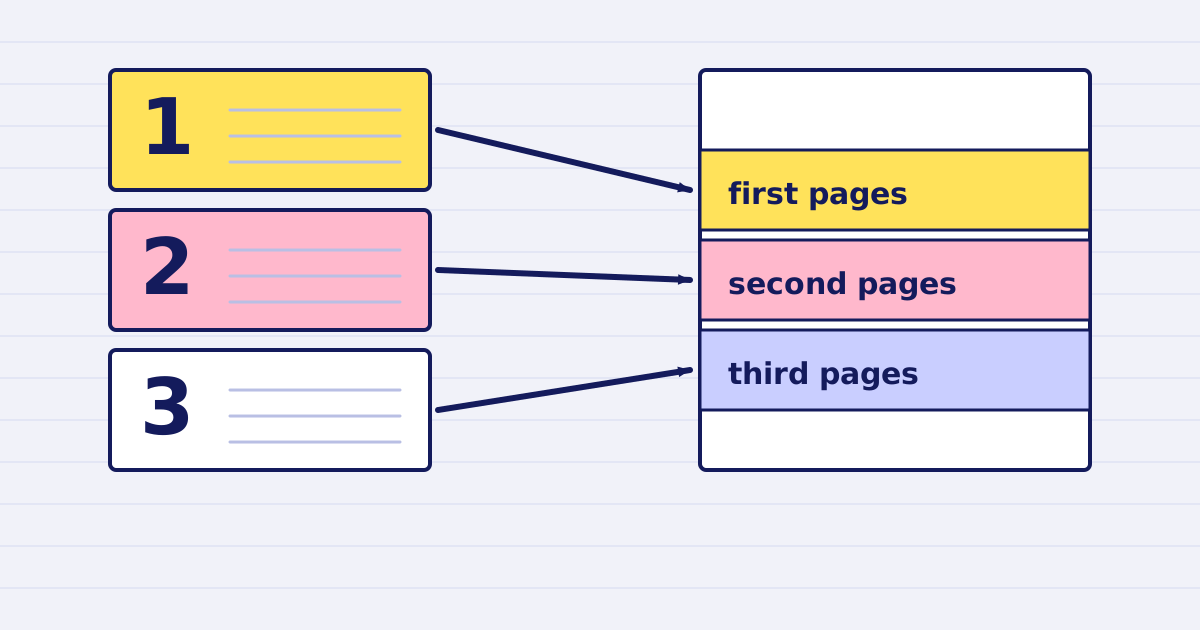
A PDF merge API should take a list of files and return one document in a known order. Three questions decide whether it fits a workflow: what happens to the page order, what happens when one file is broken, and what you pay for a failed job. The JustAPI merge endpoint answers all three in its contract. This guide walks through the request, the fields to check in the response, and the failure handling your code needs.
The merge endpoint is in beta. Check the merge API reference before you depend on any detail that is not in this article.
The request
POST https://api.justapi.tech/v1/pdf/merge takes a sources array. Each entry is an object with a url. The array needs at least 2 entries and accepts at most 50. The first URL becomes the first pages of the output, and the pages of each file keep their order inside it.
curl https://api.justapi.tech/v1/pdf/merge \
  -H "Authorization: Bearer YOUR_API_KEY" \
  -H "Content-Type: application/json" \
  -d '{
    "sources": [
      { "url": "https://files.example.com/contract.pdf" },
      { "url": "https://files.example.com/annex.pdf" },
      { "url": "https://files.example.com/signatures.pdf" }
    ],
    "options": { "output": "url" }
  }'
Replace the example URLs with public PDFs that the service can download. Each source must be a public http or https address served with a Content-Length header. Private and internal addresses are refused.
The API does not sort your list. If the order of your files depends on dates or form answers, sort them in your application before you send the request.
Read the response
A successful call returns 200 with a job_id, a status of completed, a result object and a billing object. These are the fields worth checking in your workflow:
| Field | What to check |
|---|---|
result.url |
The signed download link. It needs no Authorization header |
result.expires_at |
The time after which the link stops working. Download before it |
result.file_id |
The id to acknowledge when you have a copy |
stats.sources |
The number of sources the job read. It should match your list |
stats.pages |
The page count of the merged PDF |
stats.source_pages |
An array of integers you can compare with the page counts you expect |
billing.charged_micros |
What the job cost, in millionths of a dollar |
Compare stats.pages with the sum of the page counts you know for your inputs. In one test run, merging two 15-page PDFs produced one 30-page PDF. If your numbers do not match, do not treat the file as final.
After you download the file, acknowledge it so it is deleted at once:
curl -X POST https://api.justapi.tech/v1/files/fil_example/ack \
  -H "Authorization: Bearer YOUR_API_KEY"
All or nothing
The merge is all or nothing. If any source cannot be downloaded, is not a readable PDF, is encrypted, or fails in the worker, the whole request fails. Nothing is stored and nothing is charged.
The error names the failing source. It includes source_index, counted from 0, and source_url. The common cases are:
400 invalid_source: a URL was refused or could not be downloaded. See invalid_source.413 file_too_large: one source, or the total, is over the limit. See file_too_large.415 unsupported_media_type: a source is not a readable PDF. See unsupported_media_type.422 encrypted_pdf: a source is encrypted. See encrypted_pdf.
Your code should treat a failed merge as a list problem, not a network problem. Log the source_index, fix or replace that file, and send the complete corrected list again.
Retries and idempotency
A retried workflow must not create a second billable job by accident. Put a stable key in the body as idempotency_key. The body field wins over an Idempotency-Key header if you send both.
Use the same key only for the same list of sources and options. If you reuse a key with a different body, the API returns 409 idempotency_conflict. When the list changes, generate a new key.
Limits to design around
- Two to 50 sources per request.
- 200 MB total input. Each source must also be within your plan's file limit.
- The merge runs synchronously. Build your timeout and your user messages for that.
options.outputdefaults tourl. Use"base64"only when the result is at most 15 MB, as the schema states. Otherwise keep the URL.
What it costs
You are charged only when the merge succeeds. The price depends on the size of the merged result, not on the number of sources. At the first volume tier, a result up to 25 MB costs $0.015, and a result from 25 to 200 MB costs $0.04. Prices fall with monthly volume: the second tier is $0.012 and $0.035, and the third is $0.010 and $0.030. The pricing page has the full table and the calculator.
When the free tool is enough
For a one-off join of two or three files, the free PDF merge tool is faster. Use the API when the list comes from a system, when the files are larger, or when a failure must be handled in code. The free tool article explains its limits.
Start with a test list
Start free at app.justapi.tech. New accounts get 1 USD of credit with no card, which is enough to test a merge with a few non-sensitive PDFs. Build one test that checks the page count and the order of the output, then add your real files only after that check passes.
Keep reading
-
Free online PDF merge: join up to three PDFs in order
Join two or three PDFs in the order you set, for free, with no account. Learn the 8 MB limit, what the free tool sends, and when to move the job to the API. -
Schedule a daily JSON to Excel export with cron
Run a daily JSON to Excel export with cron: one idempotency key per run, a download before the link expires, and a size check. Script and crontab line included.